
Time to Read 4 min
Do you need a quick overview of a complex system? Do you frequently have to explain the functionality of a system? Do you face the task of developing a system from scratch and are not sure about which architecture is the best? Do you need to replace an old system without documentation? In all these cases, data flow diagrams can assist you and help you to simplify communication with other people involved.
Why does No One Create Data Flow Diagrams Anymore?
Data flow diagrams were defined over 40 years ago as part of the then popular structured analysis (e.g. by Tom DeMarco). Structured analysis uses data flow diagrams to analyze business requirements and map them into software (SW).
With the appearance of object oriented analysis (OOA) and the therein used unified modeling language (UML), data flow diagrams got less important. A big part of this disappearance is because UML does not use pure data flow diagrams. You usually get the advice to simply draw a UML activity diagram, but this diagram type primarily shows the control flow of a software. Additionally, it allows to indicate data flows. However, this mixture of control flow and data flow can make it hard to focus on the essentials when analyzing and designing a new system.
Which are the Advantages of Data Flow Diagrams?
Using pure data flow diagrams during the early stages of system design has many advantages:
- Simple notation allows discussion with all relevant people
- Quick identification of functionality
- Simplified partitioning of hardware and software
- SW partitioning into different (interrupt) execution contexts
- Better identification of interfaces
- Optimization of redundant processing steps
- Independence from implementation
Is there a Standard Notation for Data Flow Diagrams?
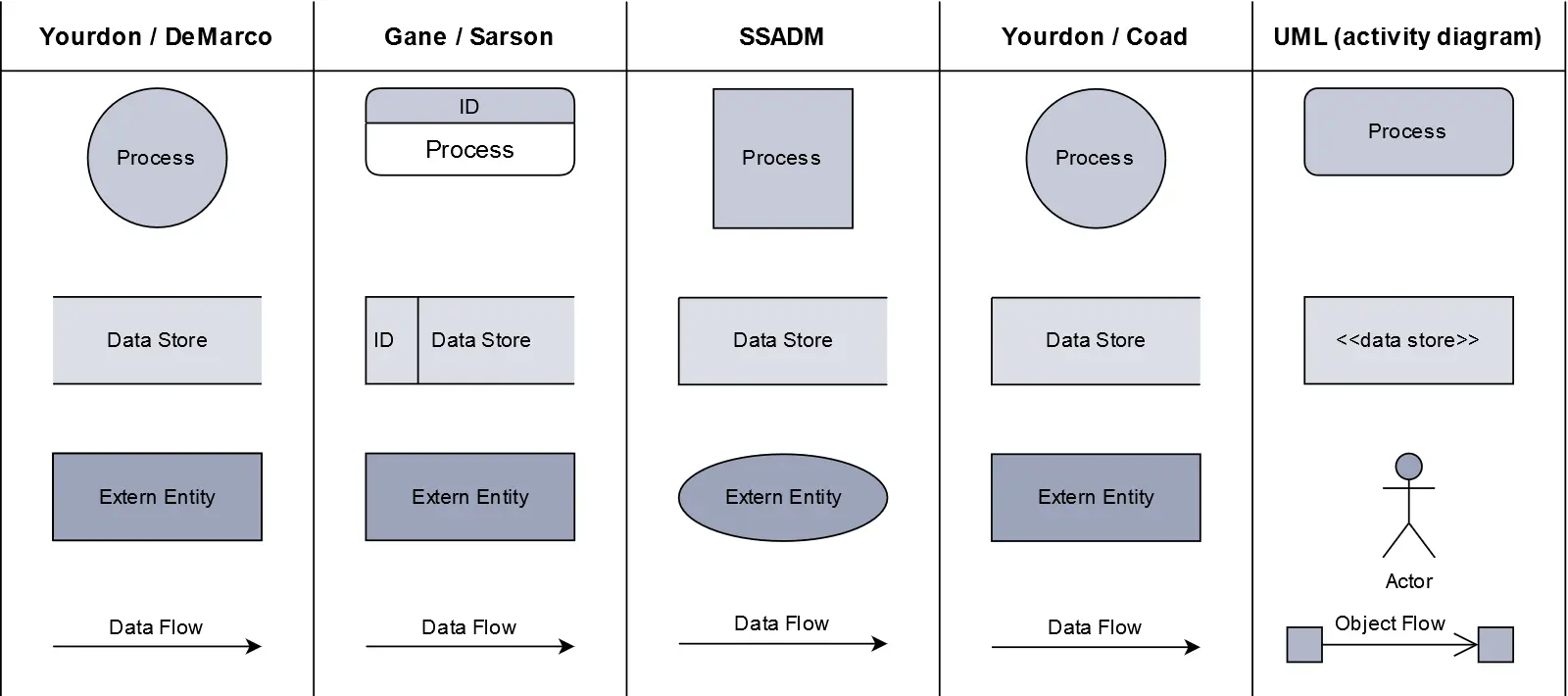
Data flow diagrams have hardly evolved in the last 40 years. Particularly, no standard notation has been established. However, the basic structures of data flow diagrams are so simple that they are usually understood without further explanation. Hint: Make sure to add a legend and / or a data dictionary to your diagram in order to leave no room for interpretation.
What are the Elements of Data Flow Diagrams?
Data flow diagrams consist of the following elements:
- Processing functions (Process)
- Storage / databases (Data Store)
- Start / end points (External Entity)
- Data flow arrows (Flow)
Some common notations can be found in the following table:
How can Data Flow Diagrams be Extended?
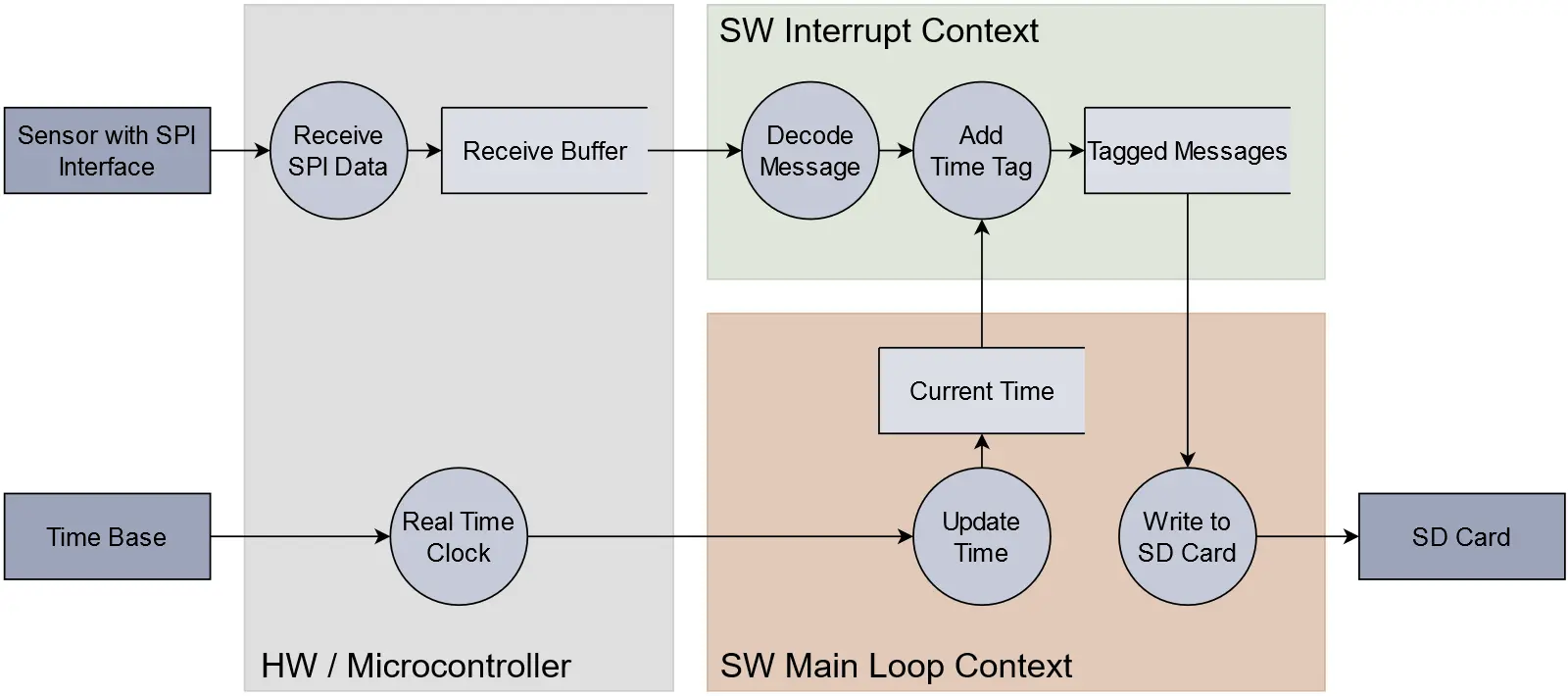
Data flow diagrams can even do much more. By using graphical frames and backgrounds in different colors, it is possible to represent a variety of information that is essential to your specific system architecture. Using this method, function and memory blocks can for example be assigned to system components. In particular, the following categories should be considered:
- HW components
- SW components
- SW tasks / processes / interrupt handlers
- Parts of a distributed system
- Redundancy
- Trust boundaries (for Threat Modeling)
The figure below shows a data flow diagram of a basic data logger consisting of a hardware part and two software parts. Note that the interrupt handler is separated from the main loop.
For Which Applications are Data Flow Diagrams Particularly Useful?
If analog or digital signal processing is a central aspect of your system, data flow diagrams are even more beneficial. These systems usually consist of many independent processing steps which are split into several parallel processing paths. Such structures can be represented in a data flow diagram in an easy and clear manner.
How are Data Flow Diagrams Used in Functional Safety?
Many standards in the domain of functional safety recommend that software architectures should be defined by means of a data flow analysis and / or verified as part of a software safety analysis, including the following: ISO 26262-6, DO 178C, IEC 61508, ISO 13849, EN 50128. Systematic safety risks can thus be identified at a very early stage of development and the designed system and software can be simplified and optimized at the same time. A data flow analysis is performed using data flow diagrams.
How are Data Flow Diagrams Used for Cybersecurity?
Data flow diagrams simplify the process of conducting a TARA (threat analysis/risk analysis) with technical and non-technical stakeholders right at the start of a project. They serve as the basis for modeling and assessing potential cybersecurity threats. The data flow diagram is often extended with trust boundaries to identify assets that require special protection. A data flow diagram can be drawn in a very early phase of the product lifecycle, when nothing is yet known about the actual implementation.
Use data flow diagrams!
Data flow diagrams are easy to read, support the understanding of the software architecture, and make communication with involved people easier. Weak points and errors in your system can be discovered early on. The result is a better system architecture and a reduced number of systematic errors. Data flow diagrams are therefore very effective. Hence, it is worth going through the modest effort to create them. A data flow diagram can be created in one to two days, depending on its complexity. In contrast, the search for a systematic error can take weeks and cause enormous loss of reputation.
Use our SolceptClinic and send me your specific questions about system architecture. And best of all: this first time-boxed consultation of 30 minutes does not cost you anything.
Daniel Megnet
Do you have additional questions? Do you have a different opinion? If so, email me or comment your thoughts below!

No Comments